
Relays: Manual and Auto
A relay is a switch that your Sap Spy hub opens and closes. With one you can start a generator, run a vacuum pump or a transfer pump, or keep heat tape on when it freezes. Each hub can drive up to two relays.
Every relay has two modes:
- Manual: you turn it on and off from the app or the website.
- Auto: the hub turns it on and off by itself from its temperature probe, at temperatures you choose.
All of this lives on the hub's Device Settings page, in the Relays section.
Relay type: what is wired to the relays#
Sap Spy needs to know what is wired to your hub's relays, because the three setups we sell switch in opposite directions. Pick the wrong one and On and Off swap: tapping Turn on turns it off.
Your hub was set up with the right type when it shipped, so most people never touch this. Change it only if the equipment wired to the relays changed, for example you swapped a power strip for a motor starter.
| Relay type | Relays | |
|---|---|---|
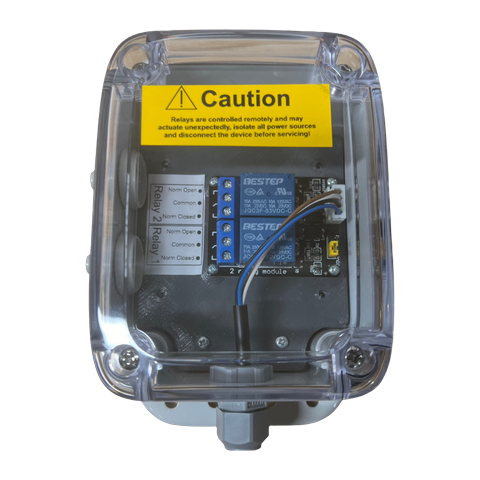 | 2 Relay Control Module Two relays in a clear weatherproof box, each with Normally Open, Common and Normally Closed terminals. Wire a generator start, a pump contactor or anything else that needs a dry contact. | Relay 1 and Relay 2 |
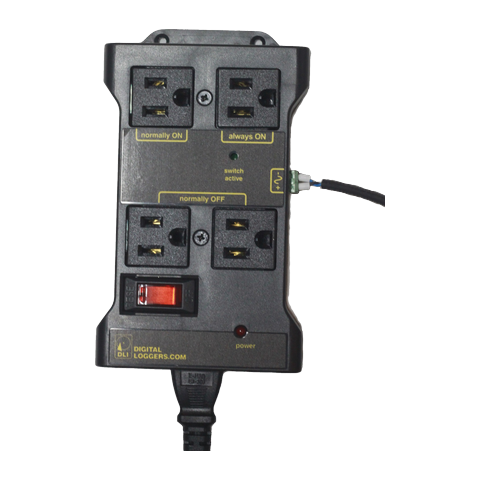 | IoT Power Strip Plug 120V equipment straight in. The relay switches the normally ON and normally OFF outlets; the always ON outlet stays powered. | Relay 1 only |
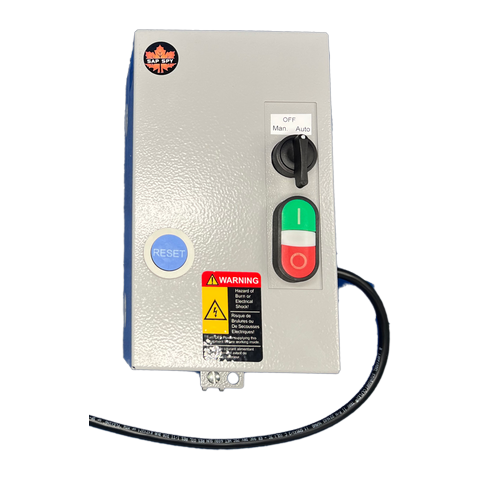 | WEG Motor Starter For a pump over 1 HP. Set the selector on the panel to Auto so the relay controls it; Man. runs it from the green and red buttons on the panel. | Relay 1 only |
To change it:
- Open the hub's Device Settings.
- Under Relays, tap the name next to Relay type. The three pictures open.
- Tap the one that matches what is wired to the hub. A red warning reminds you that the wrong type swaps On and Off.
- Tap Save Settings.
The IoT Power Strip and the WEG Motor Starter use one relay, so when you pick either of them Relay 2 disappears from the page. If Relay 2 was in Auto, saving puts it back to Manual so the hub stops switching it.
Only the account owner can change the relay type.
Manual: switch it from your phone#
In Manual, each relay has a Turn on and a Turn off button.
- Tap Turn on or Turn off.
- The button shows Sending… while the command goes to the hub. An awake hub answers within a few seconds.
- The pill at the top of the card changes to Relay on or Relay off, with the time it switched.
A hub that sleeps between reports cannot hear a button press until it wakes. For relays you switch by hand, run the hub on Always On or keep it on power.
You can also give each relay a Name, such as Generator or Vacuum pump, so you know which is which.
Auto: switch by temperature#
In Auto the hub reads its own temperature probe and switches the relay by itself. It does not need cell signal to do it, so it keeps working when the network is down. You get a notification each time it switches.
To set it up:
- Tap Auto (Temperature) next to Mode. Nothing changes on the hub yet.
- Fill in Turn on at and Turn off at. They start at the temperatures the relay last used, or at 34°F and 30°F (1.1°C and -1.1°C), the most common setting.
- Read the sentence under the temperatures. It says in plain words what the relay will do, for example Turns on when it warms up to 34.0°F and off when it cools to 30.0°F.
- Tap Start Auto. The card says Sent to the hub when an awake hub has it, or that the hub picks it up when it next wakes.
To change the temperatures later, edit them and tap Apply. To go back to switching it by hand, tap Manual; that applies straight away. You do not need Save Settings for any of this.
Temperatures are in your account's units, °F or °C, the same as the rest of the app. Sap Spy converts them for the hub, so you never have to.
The two temperatures decide which way the relay works:
| Run when it warms up | Keep it warm | |
|---|---|---|
| Set | Turn on above Turn off For example on at 34°F, off at 30°F | Turn on below Turn off For example on at 28°F, off at 34°F |
| What happens | On when it warms up to 34°F, off when it cools to 30°F | On when it cools to 28°F, off when it warms up to 34°F |
| Good for | A generator and vacuum pump that start when sap can run | Heat tape or a heater that comes on when it gets cold |
Between the two temperatures the relay stays as it is. That gap is what stops it from clicking on and off every few seconds when the temperature hovers near one number, so Turn on and Turn off must be at least 1 degree apart. A wider gap means fewer starts.
What the hub does in Auto#
- It checks often. A hub on Always On checks every 10 seconds and switches when two readings in a row agree. A hub that sleeps between reports checks each time it wakes, so it can be a whole reporting interval late. For a generator or pump, use Always On or keep the hub on power.
- It holds for 30 seconds. After a switch the relay stays on or off for at least 30 seconds, so a motor is never started and stopped back to back.
- The buttons are hidden. In Auto you cannot switch the relay by hand from the app. Tap Manual to get the buttons back. To switch the equipment by hand on site, use the panel itself, for example Man. on the motor starter.
- If the probe stops reading, the relay stays as it is and you get a notification. The card shows The temperature probe is not reading. It goes back to normal by itself once the probe reads again.
- If the hub battery gets too low, the hub turns the relays off to save power and you get a notification. The card says the relay was turned off because the battery was low.
Notifications#
You get a notification when a relay in Auto switches, when the hub turns a relay off for low battery, and when the temperature probe stops reading. Button presses do not send one; you already know.
To turn them off or on, go to Settings, then Alert settings, and use the Relays switch.
FAQs
Auto needs the latest hub software. Sap Spy updates hubs over the air, so there is nothing to do but wait for it; once your hub has it, Auto lights up on its own. If you need it sooner, email info@sapspy.com.
Your relay type is the IoT Power Strip or the WEG Motor Starter, which use only Relay 1. If you really do have two relays wired, the type should be 2 Relay Control Module.
The relay type does not match what is wired to the hub. Pick the right one under Relay type and save. If you are not sure which you have, compare it with the pictures above or email us a photo.
Yes. Put both relays in Auto with their own temperatures, or run the generator in Auto and switch the pump by hand. See Generator Start/Stop Control for wiring a generator so it starts with no load on it.
A hub that sleeps checks only when it wakes, so the switch happens at the first check past your temperature, which may be a few degrees later. An Always On hub waits for two readings in a row to agree, and then the 30 second hold, so expect a few seconds to half a minute.
Yes. The decision is made on the hub from its own probe. The notification and the state in the app catch up when the signal comes back.
Have a question this doesn't answer? Email info@sapspy.com or call 920-809-4811. We're producers too.