
Power & Battery Guide
Keeping a SapSpy hub or node powered through the season comes down to three things: picking the right power mode, picking a charging setup that fits how often you're at the pump house anyway, and knowing what to check on the rare day something won't charge. This guide walks through all of it, producer to producer.
Power Modes and Battery Life#
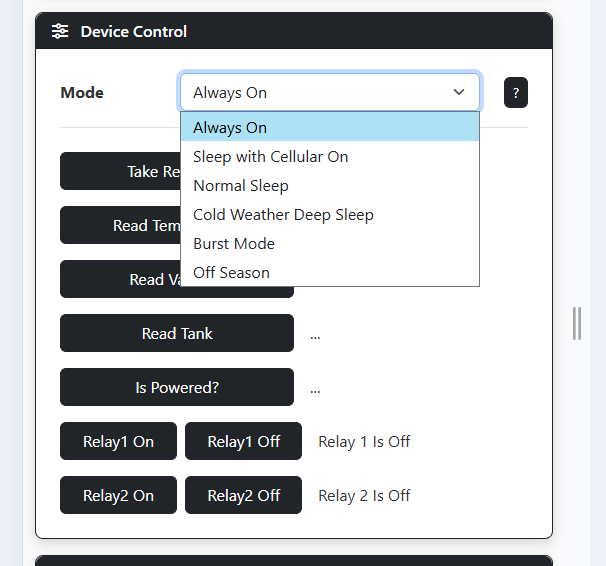
The mode you run is the biggest factor in how long a charge lasts. A sensor hub has several modes of operation:
- Always On — take readings and publish every 5 minutes
- Normal Sleep — take readings every 5 minutes, publish every 20 minutes
- Cold Weather Deep Sleep — take readings every 20 minutes, publish every 2 hours
- Off Season — take readings every hour, publish every 2 hours
- Burst Mode — take readings and publish every 1 minute
The most common settings are Always On and Normal Sleep.
Always On is like your cell phone when you're always talking on it. The hub is always connected, you can take readings on demand, and it sends the most frequent updates. In Always On, the battery lasts about seven days.
Normal Sleep is the next most common. The device is asleep most of the time, but it wakes up briefly every five minutes to take readings. Every 20 minutes it wakes up, takes readings, turns on cellular, publishes all the data out, and falls back asleep. So the app refreshes every 20 minutes, but you still get a data point every 5 minutes. In this mode a device lasts two to four weeks.
Worth knowing: the main power draw is the cellular connection itself, so sleeping modes save battery mostly by cutting how often the device transmits.
You can change the mode on the sensor hub's settings page. One thing to understand: when you switch from a sleeping mode to Always On, the device won't recognize it's in a new mode until its next awake/publish cycle.
Ways to Power Your Hub#
Three options:
- USB charging. We provide a USB cable — five, six foot long. One side screws into the bottom of the hub so it stays waterproof; the other side is just a standard USB plug, so it runs off any USB source — including a power-tool battery with a USB adapter. Most guys start here and just top it up every few days.
- 12-volt alligator clips. Instead of (or in addition to) the USB cable, hook the hub to any deep-cycle or 12-volt battery. That'll definitely last forever.
- Solar panel. A small panel, about four by six inches. It's $100 for the solar panel setup.
What most guys do is start without the solar and use the USB adapter. If the hassle factor of charging a few times a season doesn't bother them, they keep doing that. A few guys in year two or three say "it's just another thing I have to worry about" and grab the solar panel then. You can always add it later.
Keeping an Eye on the Battery#
You don't have to babysit it. We put up a little warning banner in the app once the battery's depleted below about 25% and discharging. And you can set up a text alert for low battery. So you get a bit of awareness to say, yep, that thing's not keeping up — I better bring a USB adapter out there next time.
When It Won't Charge: Quick Checks#
If a hub or node won't charge, it's almost always one of these, in order:
- Make sure the cable is fully plugged into the hub — including screwed in. People think it's plugged in; once you screw it in it makes full connection.
- Swap in a known-good USB wall adapter and cable from another hub. Fastest way to isolate a bad adapter, bad cable, or dead outlet. (USB wall adapters are notorious for going bad over time.)
- Check the outlet actually has power.
- Remove the cover and confirm the control board is fully seated — they sometimes work loose. There's an amber light inside (red on a node board) that comes on when charging, so you get instant feedback on which of the above it is.
One specific case: if the app says "battery: disconnected" (charge N/A), that's almost always the on/off button in the OFF position — push it in and it starts charging.
FAQs
Yeah, you can. The included USB cable plugs right into a tool battery with a USB adapter.
One honest heads-up though — it's not a SapSpy thing, it's the tool-battery adapter thing: as soon as the hub's internal battery is fully charged, it stops drawing current, and the USB adapter basically goes to sleep and stops putting out power. It doesn't start charging again until you unplug the tool battery and plug it back in.
But you're typically at the pump house every couple days anyway to empty the tank. So what most guys do is leave the hub in always-on mode, and the day the battery's getting lower — while you're pumping sap out or checking leaks — you just plug in the tool battery and charge it fully, then unplug it again. Keep a spare battery in the truck and it's a non-issue.
Most times, during sugaring season there's no leaves. So unless your pump house is in a pine area of the woods, typically speaking you get enough sun. If you're on the edge of a field, you'll be fine.
Options when a hub's battery is trending down:
- Top it off with a USB battery bank and the original cable.
- Put it in Normal Sleep — a lot less power, and it'll likely save itself after a day of sun. It still takes readings every 5 minutes, just updates the app every 20 instead of continuously, which is plenty for most.
- Last resort, swap batteries with another hub.
My usual recommendation is #2 — drop it into sleep until it catches some sun.
If it's still sending temperature and vacuum, the electronics are fine — almost certainly not a board failure. A 0% reading while still reporting is usually one of three things:
- Deeply drained but being supported by solar (when there's light). Early season or cold, solar won't recover a deeply discharged battery well — it may report intermittently but won't hold charge until it warms up.
- Battery at end of life — after a few seasons an 18650 can lose capacity and drop to 0% under load.
- The state-of-charge sensing isn't reading right — the battery may be fine but it just reads 0% all the time.
To tell them apart: fully charge it, reinstall it, and watch it for a day or two. If it drops to 0% fast and stops overnight, it's the battery. If it reads 0% but keeps working reliably, it's just the sensing circuit — run it for the season. (A brand-new node showing "0% / N/A" with no data at all is different — that usually means it never joined the network, not a dead battery.)
Once fully depleted below 5%, it hibernates indefinitely — it stays offline until it has power again, and the solar panel alone often won't rescue it (solar only charges once temps are consistently above freezing). Fastest fixes:
- Bring it inside, remove the cover, and plug a micro-USB straight into the board connector. The red charge light comes on; when it turns off (several hours) it's full — reinstall it and it powers itself back on.
- In the field, plug a USB battery bank into it with the original cable to top it up without hauling it out.
- If it's a solar unit and you just need to reboot it, turn it off and unplug the solar panel for 10–20 seconds — otherwise the panel keeps feeding it and it won't fully power-cycle.
Use a protected, button-top 18650 Li-ion cell — we recommend the Samsung 35E 18650 3500mAh 8A Protected Button Top (SriKo Batteries carries it). Protected plus button-top matters for fit and safe operation; it's a tight fit, but it's the highest-quality cell we've found to avoid flaky-battery problems. You can swap it in the field:
- Node: pop the small plastic clip with a flat-head screwdriver and swap the cell.
- Hub: not built for easy swaps, but doable — four Phillips screws on the cover, two small screws on the battery cover, then gently unplug the old battery from the board and plug in the new one.
If it's been through the cable/adapter/outlet/board checks and still won't charge, it's a hardware issue and we recondition it: ship the unit back, I handle repair and inspection here in Wisconsin, and send it back — or do a refund on a bad unit if you'd rather, whichever sets you up best for next season. (No rush on off-season repairs — early off-season is ideal.)
Have a question this doesn't answer? Email info@sapspy.com or call 920-809-4811 — we're producers too.
This website uses cookies that help the website to function. We use these cookies to provide you with improved and customized user-experience. By tapping 'accept,' you consent to the use of cookies. For more info, see our privacy policy.