
Checking gateway coverage with the field tester
Map My Woods predicts where a gateway will reach. The field tester measures it. Walk your woods with one in your hand and every spot where your gateway heard it lands on your map as a dot, coloured by signal. When the walk is done you know, not guess, whether the gateway is in the right place.
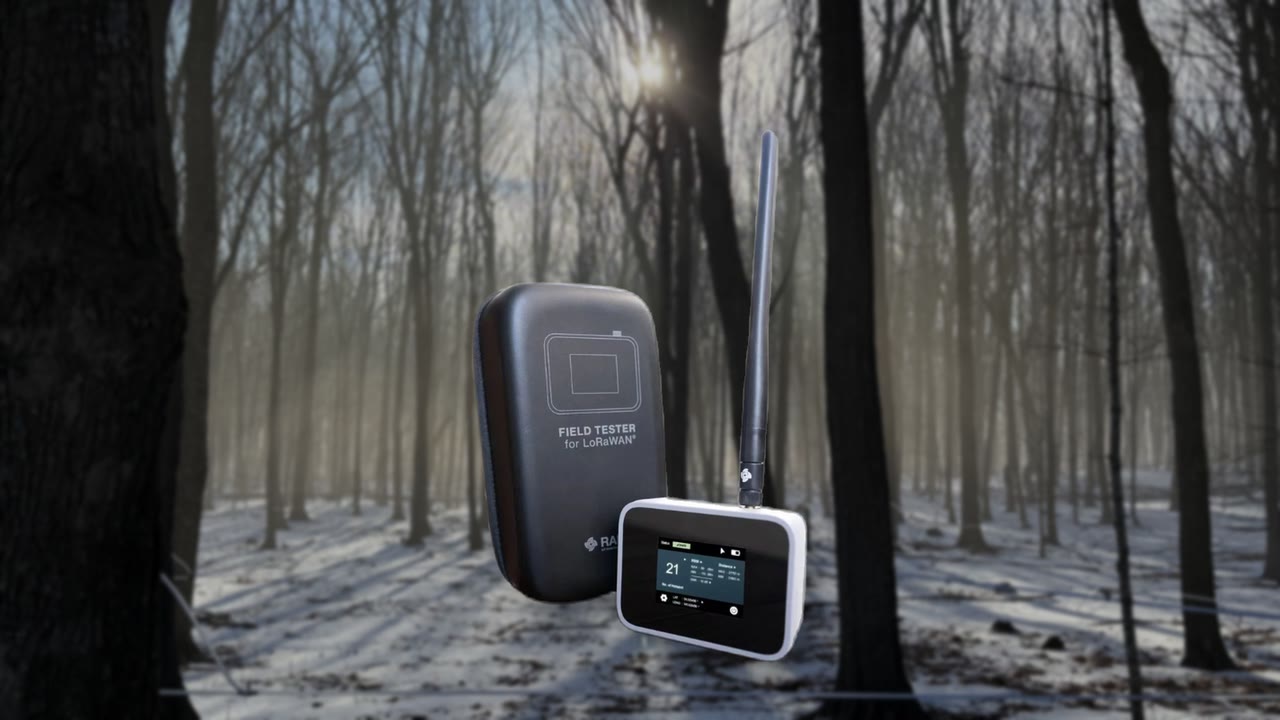
What the field tester is#
The RAK Field Tester Plus is a handheld radio the size of a deck of cards, with an antenna, a GPS, a rechargeable battery and a small screen. Every 20 seconds it sends a short test signal, the same kind of signal a Sap Spy node sends. If your gateway hears it, the gateway passes the reading to Sap Spy with the spot the tester was standing on, and a dot appears on your map within about 15 seconds.
It always sends at the slowest, longest-reach setting a node can fall back to. So what the tester hears, a node will hear. A walk measures the worst case, which is the case you want to know about.
We lend testers out. Email info@sapspy.com and we send one charged.
Before you walk#
- Mount the gateway where it will live. Height is the biggest range factor, so put it up first and test second. How to mount it: Installing your gateway. The readings are tied to where the gateway stood, so if you move it later, walk again.
- Claim the gateway in the Sap Spy app, on the site whose map you will be walking.
- Charge the tester the night before. The USB port is under the rubber plug on the side.
- Turn it on outside and give it a minute or two to find the GPS satellites. The screen shows your position once it has.
- Open your map in Map My Woods on your phone. Under Layers, Field tester readings appears in the Gateway group as soon as the first dot lands. On a computer the same dots show at sapspyapp.com/MapMyWoods.
Walking the woods#
- Carry the tester in your hand or set it on the dash of the side by side, antenna up and out in the open. Not in a pocket.
- Walk the mainlines, the far corners first, and over any rise between the woods and the gateway. Those are the places a node struggles.
- Drive the pump line and anywhere else you want a sensor: the sugarhouse, the tanks, the cabin.
- A reading every 20 seconds at a steady walk puts a dot every 60 to 80 feet. Slow down where it matters.
- When the dots stop, you have found the edge. Go a little further to be sure, then come back. No dot where you walked is a result too: the gateway did not hear the tester there.
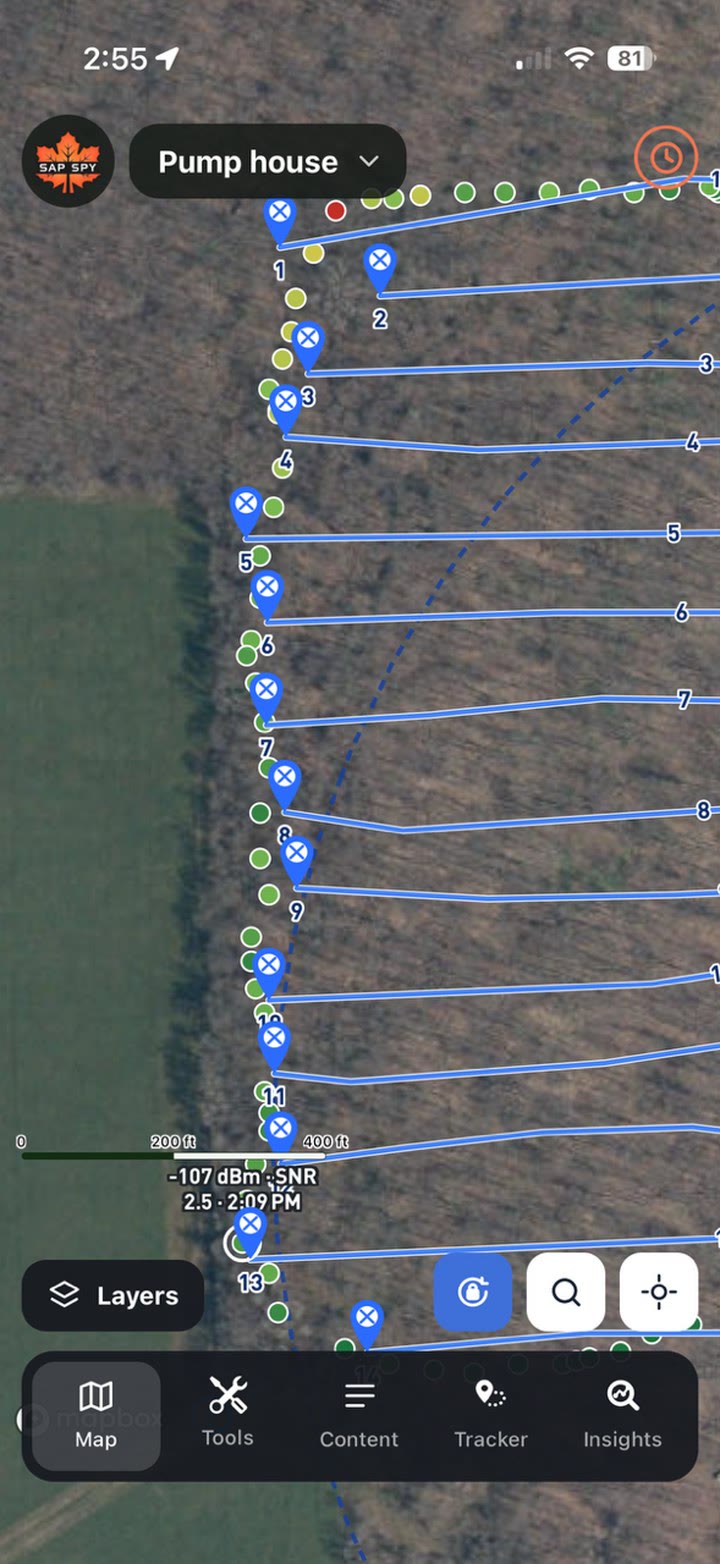
Reading the dots#
The dots use the same colours as the coverage shading: green is strong, yellow is fair, red is the edge. A red dot still reached the gateway.
Tap a dot and it says its Signal as a percent. 100% is a strong, clean signal. 0% is the edge, where a node stops talking. Anything over about 30% is a spot a node will work from day in, day out. The second line has the radio details for anyone who wants them.
An example: one real walk#
A producer in western New York mounted his gateway on the gable of his pump house, antenna tip at 11 feet, then walked his woods with the tester on a wet Saturday in November 2026, before placing a single node. Forty-three minutes, 126 readings.
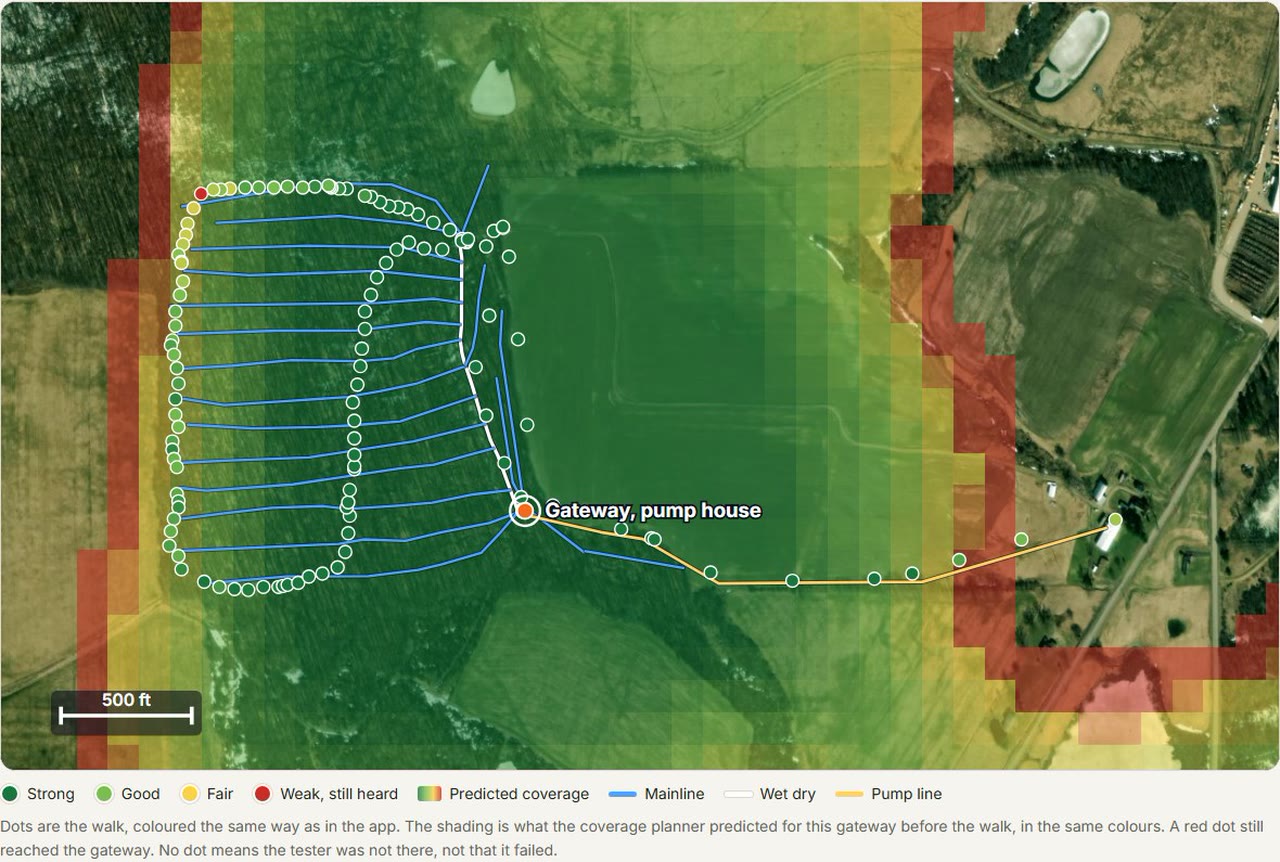
- The gateway heard him everywhere he walked, including the far north-west corner of his first four mainlines, the spot that had always given him trouble before. That corner was the weakest on the walk, with the one red dot.
- Driving home along the pump line, the gateway still heard him at his house, 2,250 feet away, a little beyond what the planner predicted.
- Inside the predicted area the real signal ran a little stronger than the planner said. The planner is set to be cautious on purpose, and the walk showed it that way round.
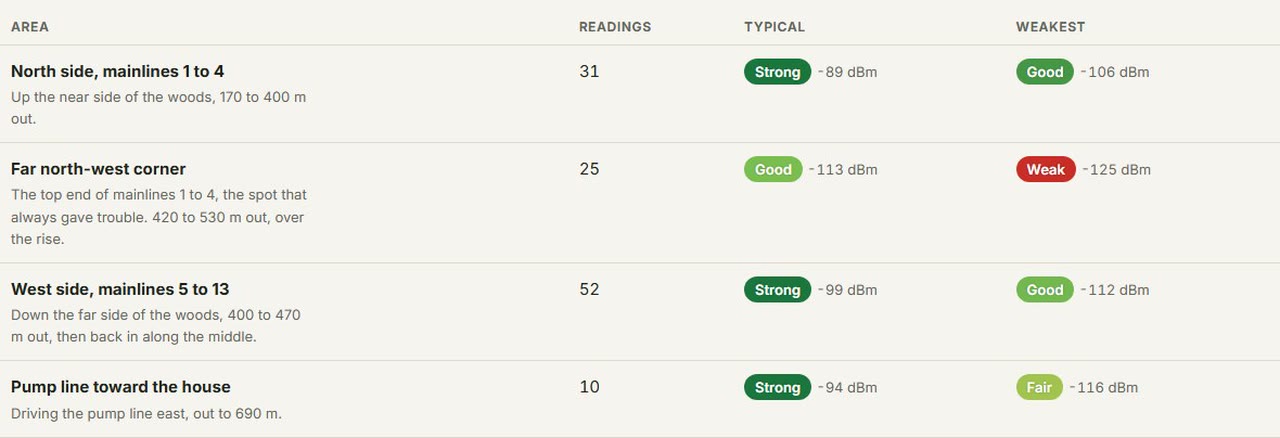
The full write-up, the kind we put together from a walk on request, is here: Example gateway site survey. His next step is the one we suggest to everyone: put the first node at the weakest spot on the walk and let it report for a week. If that one is happy, the rest of the woods will be.
Getting a tester#
Email info@sapspy.com with your name and address. We ship the tester charged, you walk, you ship it back in the same case. If you would like a written survey like the example above, say so and we will put one together from your walk.
FAQs
No. The tester talks only to your gateway. Your phone needs service to show the dots live; without it, look at the map when you are back in range. Every reading is kept.
The tester sends on its own every 20 seconds. Just keep walking. Stand still for a minute at the spots you care most about, so they get a few readings each.
Walk the whole property once. Each dot is tied to the gateway that heard it, so the map shows what every gateway covers together, the same way the coverage shading does.
Check that the gateway is powered and claimed, that the tester has found the GPS satellites (its screen shows your position), and that you are within a few hundred feet of the gateway to start. The first dot proves the chain; then walk out.
Indirectly. Mount it where you think best, walk, and look at the weak corners. If one is weak, raising the antenna is the first fix; moving the gateway is the second. Then walk again.
On the walk above the planner was within about 15 percent of the real edge, erring on the safe side, and the planner's shading was a little cautious inside the woods. Every walk we get helps us tune it further.
Have a question this doesn't answer? Email info@sapspy.com or call 920-809-4811. We're producers too.