
Tank Level Sensor Guide
Nobody wants to drive down to the pump house in the middle of the night just to look in a tank. The tank level sensor tells the Sap Spy app how full your tank is, so you can check your phone from the house and know whether you actually need to go. This guide covers how the sensor works, how to install and calibrate it, and how to sort out the common hiccups.
How the Sensor Works#
We started with ultrasonic five, six years ago — we still offer it if you really want it, but it's kind of finicky. The setup has to be perfectly level, and splashes off a mechanical releaser can disturb it here and there.
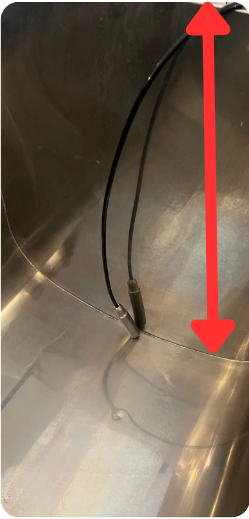
So three, four years ago we migrated to what I call the submersible. It's a pressure sensor that just sits at the bottom of the tank — a little stainless steel body that sinks right down. The more liquid in the tank, the more pressure it sees — like water-column pressure. The sensor converts that pressure into inches of liquid, you tell the app how tall your tank is, and Sap Spy converts that to percent full. That eliminates the complexity of setup.
Analog vs. Digital: Know Which Sensor You Have#
There are two sensor types, and they're not interchangeable:
- New universal nodes need a digital sensor.
- The original nodes and sensor hubs use an analog sensor.
The connector pinout differs between the two as well, so a salvaged connector wired for one won't work on the other. If you're not sure which you have, or you need a digital submersible for a newer node, reach out and we'll get you the right one.
Installing the Sensor#
- Place the stainless steel sensor at the bottom of the tank. Orientation doesn't matter — it can sit vertically or horizontally.
- Measure the total internal height of the tank, from the bottom to the overflow point, in inches. You'll enter this in the app.
Each tank sensor includes 30 feet of cable — 15' on the sensor plus a 15' extension. Additional extensions are available if you need more reach.
Setting Up the Sap Spy App#
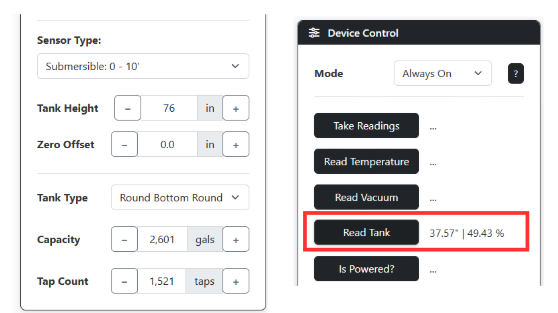
- Enter the tank height in the Sap Spy app, in inches.
- If the sensor reads a few inches above or below zero when the tank is empty, adjust the Zero Offset until it reads near 0". (More on how offsets work in the FAQs below.)
- Enter your tank details — select your tank type and total capacity in gallons so Sap Spy can estimate how many gallons are in the tank.
- To confirm everything's working: on a sensor hub, use Read Tank to see instant values from the app and check they match what you expect. On a node, simply turn the node off and on to force a reading.
Cleaning and Care#
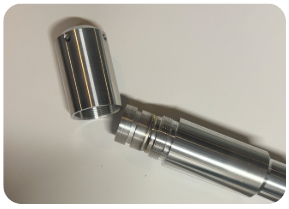
To clean the sensor, twist off the end cap and gently rinse the inside with water. Use only light pressure with a damp cloth on the internal components.
FAQs
No — and that lock-up is the tell-tale you've got the wrong sensor type on that node. Hook an old analog submersible to a new universal node and it can freeze up the whole thing — no amount of toggling ports or power-cycling gets it to read. Universal nodes need the digital sensor; the original nodes and sensor hubs use the analog one.
Two things to check:
- On the LED sight-glass/display units, set the menu sensor type to "digital" (type 2), not "submersible." A factory reset fixes it: power OFF, hold the Enter button (far right), power ON while still holding Enter through startup until it shows a level, then release.
- The pinout differs between analog and digital connectors, so a salvaged connector wired for one won't work on the other.
Need a digital submersible? Reach out and we'll get you the right one — and if you want to send the old analog one back, I can do a swap and cover shipping both ways.
For ultrasonic it's almost always one of four things:
- Not level — it got bumped or shifted.
- Disturbances on top — a releaser dumping or splash when pumping; the ultrasonic doesn't bounce properly.
- Condensation on the underside from temperature and humidity swings — just wipe it off.
- Snow or ice on top of the tank — even a thin layer keeps it from reading. That's why some folks see "tank full" below freezing that clears once it warms up.
To confirm the sensor itself is good: clean the underside, point it at a flat, hard object, use Read Tank under device settings, and check the reading roughly matches the distance. Then re-mount it level. Honestly, these four issues are exactly why we migrated to the submersible — easier to set up and far more robust. If you're fighting the ultrasonic, reach out and I'll take care of you on a swap.
We haven't had many problems with the submersible — a few here and there. In general freezing isn't a problem; the handful we've had to swap froze into a solid brick, and that's when a submersible can actually fail. A freeze-up can also throw readings off temporarily — a few bogus readings, or a level that briefly calculates below 0", can happen during a freeze. If the sensor was accurate all season and just started acting up, check whether it lines up with a freeze. If one froze solid and failed, reach out and we'll get you a replacement.
Before waiting on a replacement, two quick checks fix this most of the time:
- Clean the sensor end. That bottom barrel piece with the vent hole unscrews — it doesn't look like it, but it does. Take it off and lightly clean the pressure sensor inside; hot water works. Push evenly and lightly on the diaphragm with your finger and the reading should move. If it won't budge below its stuck value, that points to the sensor itself. A little cleaning late in the season often gets it accurate again.
- Check the connector for a loose wire. We've had a few with a loose termination — take the connector apart and confirm everything's tight. (There's a short walkthrough video for this if you need it.)
Also confirm the sensor is plugged into the SNS port — and on sight-glass units, that the LED strip is in the LED port. Still stuck after all that? I'll send a prepaid label, you ship it back, and I'll get a working unit to you.
Use the sensor offset in the menu — it's on the same settings page where you enter your tank height/dimensions and sensor type. The offset is additive: if the sensor reads 2" with no liquid in the tank, set the offset to -2. A sensor sitting below the tank bottom gets a negative offset; above it, positive — so a sensor reading 8" high gets a -8 and then reads correctly.
One limit: the max offset is 10". More than that and offset alone won't fully calibrate it — you can work around it by adjusting the entered tank height, but if it's off by that much, let me know and we'll look at swapping the sensor.
Yes — we sell a 15' extension cable for the submersible transducer (it works for the relay too). If the cable or connector got damaged — one customer's got crushed when snow slid off the roof onto it, so try not to leave it where that can happen — you can usually salvage and re-terminate the connector.
For the original analog sensor the pinout is: Pin 1 red, Pin 2 blank (a shield wire can go here on some), Pin 3 green, Pin 4 yellow. The newer digital sensor uses a different pinout, so confirm which style you have before re-wiring. Beyond repair? We'll get a replacement out to you.
Have a question this doesn't answer? Email info@sapspy.com or call 920-809-4811 — we're producers too.
This website uses cookies that help the website to function. We use these cookies to provide you with improved and customized user-experience. By tapping 'accept,' you consent to the use of cookies. For more info, see our privacy policy.